

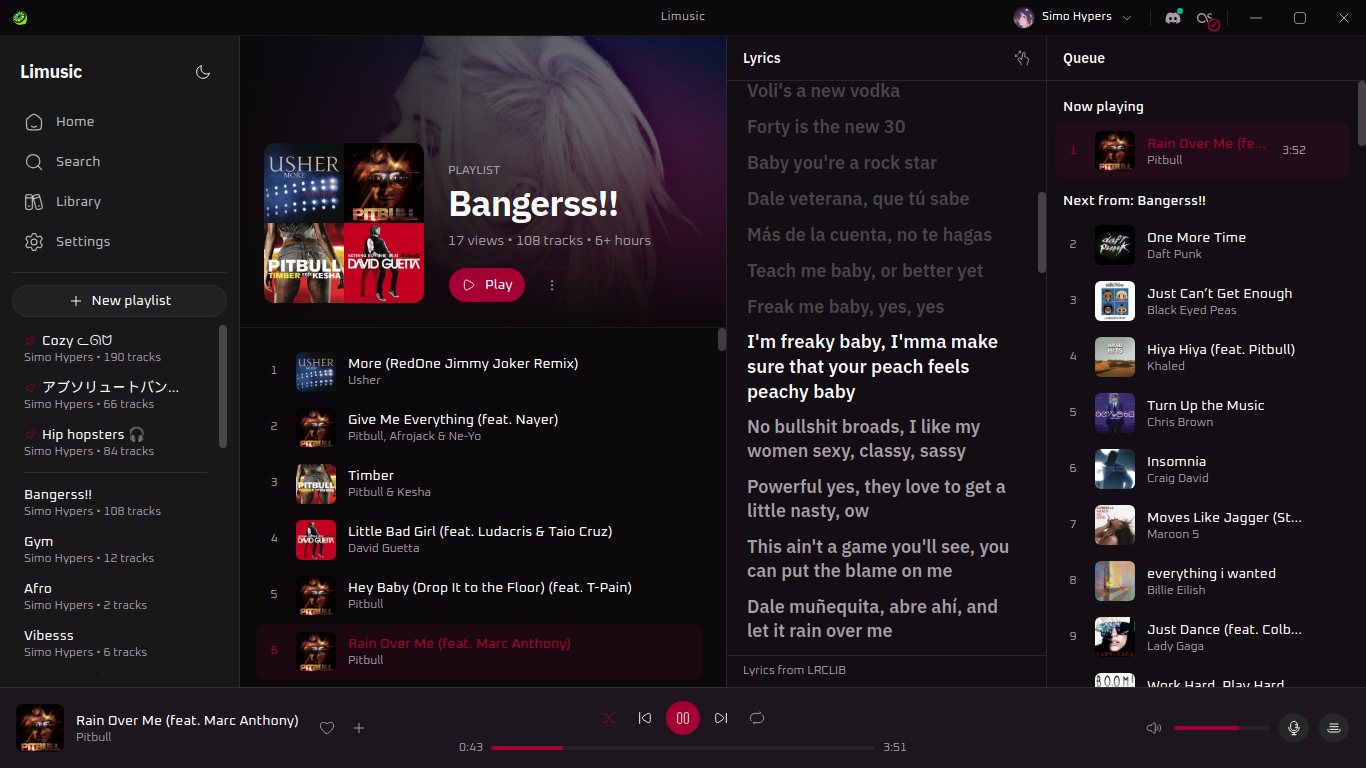
My music setup was a pinned browser tab for years. It worked, technically. It also ate RAM doing nothing, my media keys only worked when that tab happened to be focused, and I killed the music at least once a week by closing the wrong window. There’s no official YouTube Music desktop app on Linux, and most of what exists is the same web player in an Electron shell.
So I built my own. It’s called Limusic. Rust and Tauri, no bundled Chromium, audio goes through libmpv.
You sign in with your actual YouTube Music account, so your playlists, likes and subscriptions are just there, and liking a song or adding it to a playlist syncs back like you’d expect.
The part I actually care about is that it’s not bare bones:
- Proper MPRIS, so media keys and your now playing widget just work
- System tray, closing the window doesn’t kill the song, plus play/pause and skip from the tray
- Discord Rich Presence with album art and a live progress bar
- Last.fm scrobbling, connect once and forget about it
- Synced lyrics in a side panel, click a line to jump there
- Listen Together, synced rooms so you and a friend hear the same thing at the same time
- 8 themes, including Catppuccin, because obviously
- Gapless playback, volume normalization, shuffle, repeat, autoplay radio
- Your queue survives a restart
Free and open source, GPL. AppImage (self updating) or an rpm for Fedora, which is what I daily drive. No Flatpak or AUR yet, both are on the list. There’s a Windows build too, and no macOS one yet.
Would really love for people to try it, and I’d genuinely like to hear what everyone thinks. ❤️
Site: https://simohypers.github.io/limusic/ Downloads: https://github.com/SimoHypers/limusic/releases/latest
Not affiliated with Google or YouTube, just a thing I made because I wanted it
These are instructions to locate the login cookie for YouTube that’s stored in your browser so that you can import it into OPs program. Start with the network tab of the browser’s dev tools.
So how do I do that? How specifically do I find a youtube login cookie? I tried searching, but could not find any useful guides.
When I look in Dev tools in firefox I see a big pile of nonsense. I guess what would be really useful here is an installation guide with actual screenshots and detailed instructions. The instructions provided assume a lot of background knowledge that most people will not have.
Sure I could just log in, but I also don’t want to trust my log in details to a random program I download.
Then you definitely don’t want to give a random app your cookie.
TBF giving an authenticated cookie to a software is much better than login credentials, but still if you don’t trust the software and believe access to your account may lead to sensible data you should not do that.