This is driving me insane. Please help!
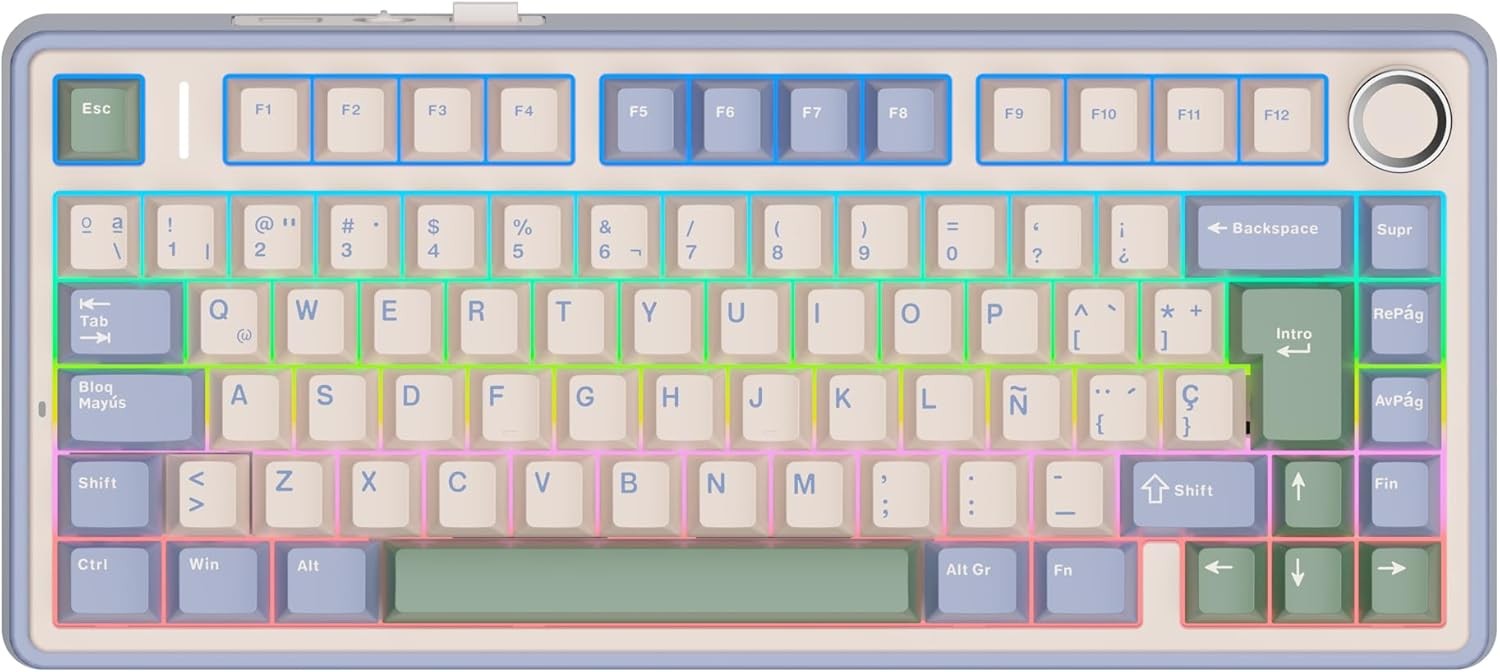
That’s a weird layout, it doesn’t seem a proper Spanish (Spain) layout.
The apostrophe is the button right to the 0, but on the image it seems that is shift+?
The symbols on 1 are correct, but on 2 and 3 seems swapped, like for @ and # is shift+2/3 but in Spain it is AltGr+2/3
EDIT
Definitely OP’s image keyboard is not from Europe, it lacks the € symbol printed on the E.
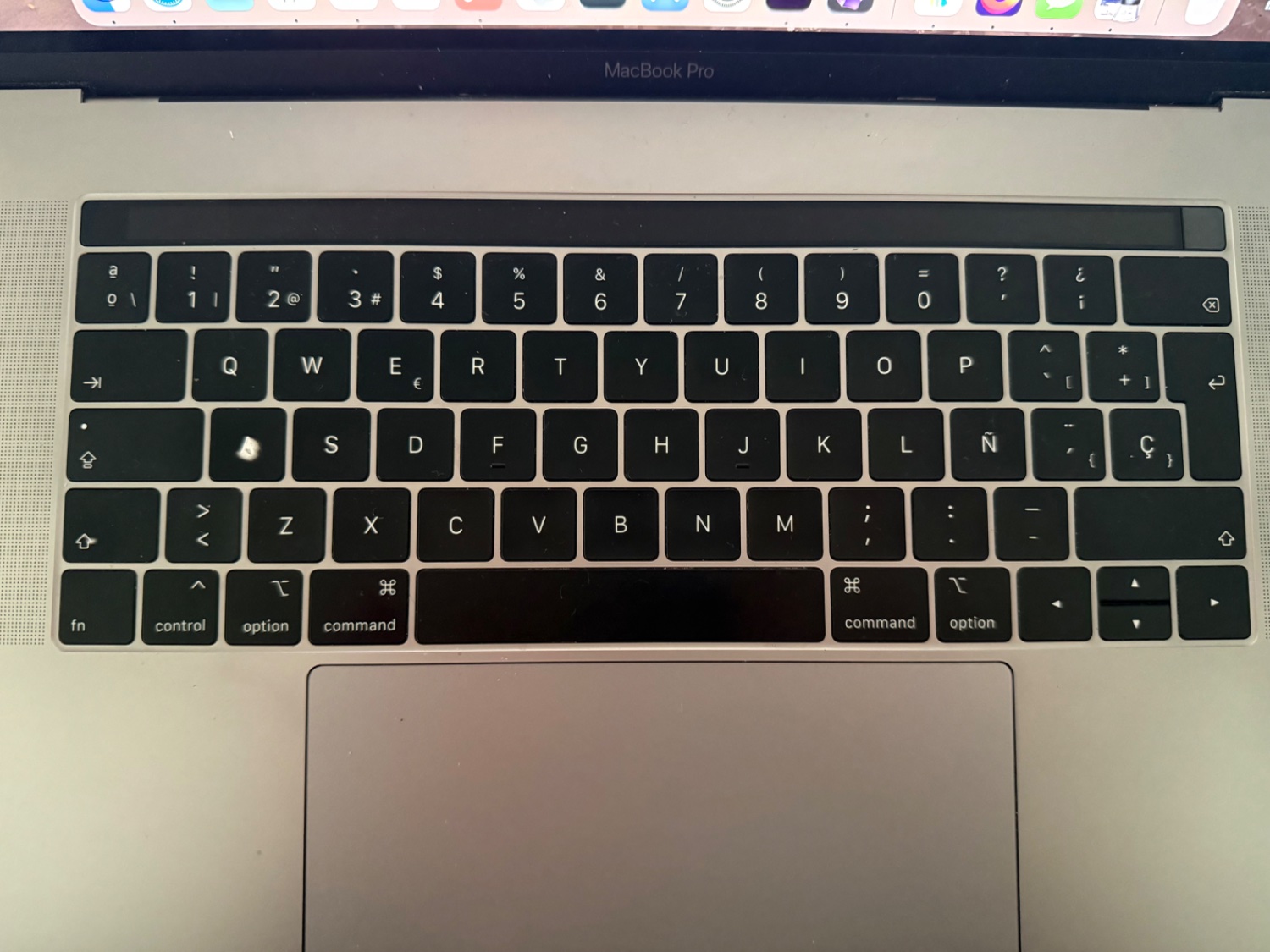
Use the AltGr key!
AltGr is a key on ISO keyboard, it means Alternative Graphic, and when you hold it and press either [ or { you should get the correct glyph.
Note that you won’t see it at first, it waits for the next character and will modify it to include the change, or insert it in front of the next character if the character does not use modifiers.
You can press space after triggering the glyph to just print it separately.
Useless info: The backtick (`), forward tick (´), and apostrophe (') are distinct characters.
You’re a distinct character.
Why i oughta
We are in a community called “no stupid questions”. Your “fuck you for giving someone useful information” is not in the right place in this community. Please copypaste your comment to something under .ml and then remove it from here. Thanks!
Either you’re making some sort of joke that escapes me or you completely misunderstood my comment.
T́h́é fóŕẃáŕd́ t́íćḱ íś áćt́úáĺĺý ćáĺĺéd́ áćút́é àǹd̀ t̀h̀è b̀àc̀k̀t̀ìc̀k̀ ìs̀ à g̀r̀àv̀è
You can have some fun with these terms.
Also, there are Czech and Slovak oddities with carons where it looks very much like a 9-shaped curly apostrophe (’) on some letters. All the following nouns are common, spelled correctly and the only accent they contain is one caron each. Standard and monospace font are provided for comparison (some monospace fonts, especially pixel ones, actually squish the d-caron to avoid overflow)
1 2 3 4 ľudia loď lodě mať people ship ships mother 1 2 3 4 ĽUDIA LOĎ LODĚ MAŤ PEOPLE SHIP SHIPS MOTHER ľudia loď lodě mať people ship ships mother ĽUDIA LOĎ LODĚ MAŤ PEOPLE SHIP SHIPS MOTHERMaybe that’s why Czech and Slovak never use upper-9 quotes, the primary („“) and secondary (‚‘) quote marks are lower-9 and upper-6.
This is actually quite a pleasing look. Like text that’s overgrown by jungle foliage.
It’s Zalgo (putting combining diacritics on every letter) but mild and consistent, plus I used native accented characters if available to improve rendering consistency
àèìǹòùẁỳ
áćéǵíj́ḱĺḿńóṕŕśúẃýź
You can test if your text renderer adds combining diacritics as overlays or replaces with native glyphs:
- ď (d-caron)
- ď (d plus combining caron)
- ԁ̌ (Cyrillic ԁ aka “komi de” or “lowercase Ԁ” plus combining caron)
Most renderers will use identical glyphs for #1 and #2 because #3 (using a d-lookalike (hompglyph) to simulate how cheap Czech typewriter users would print lowercase d-caron) is not how d-caron looks in print (the closest ASCII-safe rendition of that, if you still have encoding problems, is d’)
That’s some very clean Zalgo. I am mainly familiar with this version H̵̛͕̞̦̰̜͍̰̥̟͆̏͂̌͑ͅä̷͔̟͓̬̯̟͍̭͉͈̮͙̣̯̬͚̞̭̍̀̾͠m̴̡̧̛̝̯̹̗̹̤̲̺̟̥̈̏͊̔̑̍͆̌̀̚͝͝b̴̢̢̫̝̠̗̼̬̻̮̺̭͔̘͑̆̎̚ư̵̧̡̥̙̭̿̈̀̒̐̊͒͑r̷̡̡̲̼̖͎̫̮̜͇̬͌͘g̷̹͍͎̬͕͓͕̐̃̈́̓̆̚͝ẻ̵̡̼̬̥̹͇̭͔̯̉͛̈́̕r̸̮̖̻̮̣̗͚͖̝̂͌̾̓̀̿̔̀͋̈́͌̈́̋͜ which looks… quite messy xD
deleted by creator
I don’t have the energy to set one up, or to moderate one, but there should be a community called “GeneralInterestClub” or similar, where interesting but not really super useful info like this would be reposted.
Seems like this would fall under TIL or maybe mildlyInteresting.
YSK: If you set keyboard layouts to thier versiones suffixed with “no dead keys” they don’t do that. Instead the character ist rendered immediately.
And then you don’t have dead keys.
You press `, then you press e. You get è without needing a specific key for that. The standard Finnish keyboard can do at least the following: ãẽĩõũṏñṽēūȳīōāḡȫǟǖŵêŷûîôâŝĝĥĵẑĉẇėṙṫẏıȯṗȧṡḋḟġḣȷŀżẋċḃṅṁẉẹṛṭỵụịọạṣḍ̣ḥḳḷẓ̣ṿḅṇṃțșȩŗţşḑģḩķļçņẃéŕýúíóṕáśǵj́ḱĺźćǘńḿẁèỳùìòàǜǹm̀ěřťǔǐǒǎšďǧȟǰǩľžčǚň
If I disable deadkeys, I lose all those characters. Many people on this planet have names that require those, and it’s a bit stupid not having them. Pressing space every now and then is not that much of work :)
Oh, and indeed: On the Finnish keyboard ~ is a deadkey. You get it by pressing the "^~ key together with AltGr, then pressing Space.
I did not state anything different, nor did I suggest to switch to a “no dead key layout.” It’s an option that might be a consideration for individuals.
Interesting!
I have wondered about that!
Thank you! I will give it a try. Hitting the key than spacebar works in Firefox and Signal but not much else.
Than… Do you mean then?
Don’t be that person.
Where does it not?!
That’s a compressed layout so print screen is missing.
And alt gr + [key] generally gives you the third symbol to the right on the key, behaves like a second shift for the number row, etc
You hold the Function (FN) button or the AltGR button and then the labeled buttons you want.
If the pictured keyboard is the one you’re using: It looks like it doesn’t have a Print Screen button. It’s not a full size keyboard.
Isn’t it
shift-??For the apostrophe, yes.
Print screen is usually marked “Impr Pnt” or similar.
Source: I use a Spanish keyboard
Then it is most likely on the second layer via the Fn key, I’ve seen a couple use Fn-P but check your manual OP
Alternative to print screen is to use whatever screen shot tool is built into your OS (Screenshot on Mac & most sane Linux distros, Snipping Tool on Windows)
Alt+gr is top right on key
Not familiar with that layout, but just looking at it I see there is a ’ printed on the question mark key, to the right of zero. So try pressing that key in combination with shift, or if that doesn’t work, AltGr.
Print screen, I suspect you’ll have to look up in that specific keyboard’s manual. On a full size keyboard that doesn’t need an Fn key it would certainly be where it is in all other languages. I suspect it is hidden behind a combination with the Fn key but since it isn’t printed on there, I can’t tell for sure.
That’s a mechanical keyboard, so you should be able to map the missing keys to wherever you like.
Failing that, PrtScr is probably on Fn+P, and apostrophes will be Alt Gr+{, Alt Gr+[ or Shift+?. The first two look like they may be accent dead keys, so try Shift+? first, or follow them with a space.
What’s the thing on the upper right corner of the key with number 3? Could it be the apostrophe? Try AltGr+3 and see what happens. Or maybe it’s Meta+3? Meta is the key between left Ctrl and left Alt. You can also try AltGr+Shift+3.
Above the 3 is the punto medio. Its not used in Spanish, but like the ç next to the enter key is it used in Catalán.
That keyboard should come with a manual. Doesn’t it say what do you have to press?
Power toys and remap it?
https://learn.microsoft.com/en-us/answers/questions/4098471/how-can-i-change-my-screenshot-hotkey-(from-window
I’m using Linux. I know I can remap it but surely there has to be a more proper way. I would think, anyway.
You can just set the layout to US (or whatever you’re accustomed to) and go by memory. 3 keys are different between ISO and ANSI, most characters are where your fingers expect them to be
I know I could do that but that would defeat the purpose of using a Spanish keyboard. I want to type Spanish characters without switching layouts.
Up to you, but personally I’m a European that uses the US layout most of the time as it’s especially nice in a terminal, and have a quick switch hotkey (win-space) to switch over when I need accented characters
I use the terminal a lot and i’m still getting used to the dash key being at the bottom. It’s an adjustment.
No need to mess about with modifying the layout, just use the AltGr key as I wrote about earlier.
deleted by creator